 LeronX Shield
Secure AI browser · coming soon
Say your task in plain words. It takes care of the rest.
And it shows you what it checked. You don't have to take its word for it.
When it is released, you will just tell it in plain English what you need: find, compare, verify, fill in. It takes the task on itself, inside your browser window, and shows its work — which sites it opened, what it found, and what it confirmed on the page. No terminals, commands or setup. If a task needs your account or a payment, it stops and asks. Here security isn't a feature, it's the foundation.
Coming soon. LeronX Shield is in development and is not released yet. Get notified
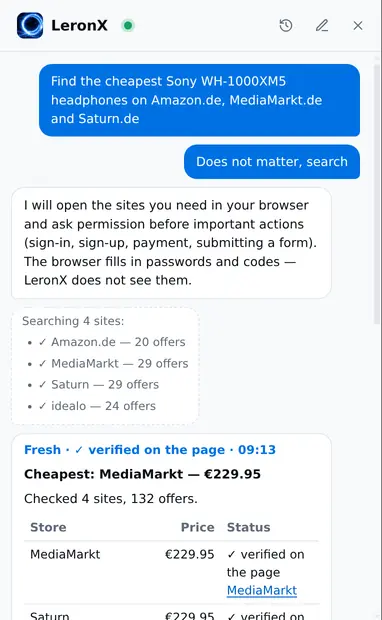
A real agent answer, 10 November 2026. Screenshots are taken in the English interface; by default the browser launches in Russian.
Security is the foundation
Two lines of defense: a known-threat database and real-time analysis of its own
LeronX doesn't just match a blocklist. First the address is checked against a database of known malicious sites. Then the browser analyzes the page, the wallet signature and the token itself — and catches new threats that aren't on any list yet.
Known-threat database
Known malicious and phishing addresses from the public URLhaus and Phishing.Database lists. The match runs locally, on your computer; the addresses you open are not sent anywhere for this check. The lists refresh every few hours.
The optional Google Safe Browsing check is off by default; when you turn it on, only a 4-byte hash prefix leaves your device.
Real-time analysis of its own
Beyond the database, LeronX analyzes each site, wallet signature and token for signs of fraud — so it also catches fresh threats not yet on any list. This is a set of heuristics, specific checks and the AI assistant's reasoning, not "magic that catches everything".
- lookalike / homoglyph (punycode) domains
- risky wallet signature requests (unlimited approvals, setApprovalForAll, permit, eth_sign) — Ethereum-compatible wallets only; there is no list of known drainer addresses
- honeypot tokens and contract checks
- tech-support scams
- refusing to enter a wallet seed phrase
- crypto address swapping in the clipboard
- sites without HTTPS and dangerous downloads
You speak, it acts, and it shows its work
You write in plain words; the sites can be in any language. Here is how it looked on a real task on 10 November 2026.
- You say
"Find 3 hotels in Barcelona for 11–14 December under €150 a night with free cancellation."
On the screenshots the task is written in English — we capture the app in its English interface.
- It clarifies
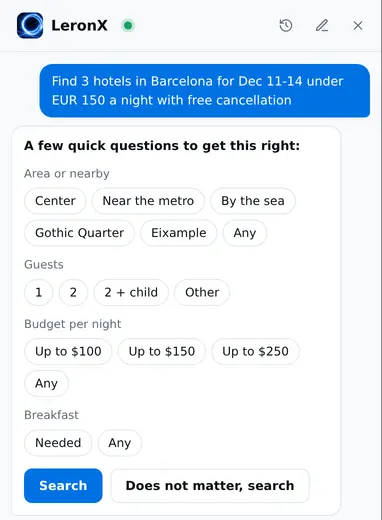
- It acts
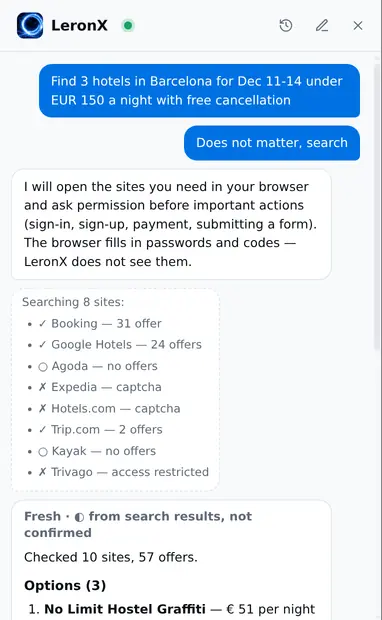
- It shows what it verified
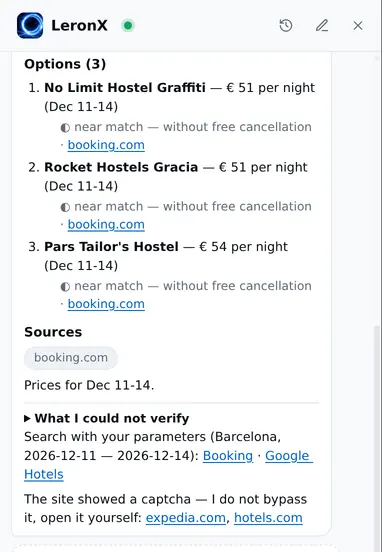
Free cancellation wasn't included at that price — the agent said so plainly. It does not bypass captchas.
- ✓ verified on the page
- the name and price were found together on the open page
- ◐ close match
- not a full match, and it says how
- not confirmed
- the page didn't show it, or it closed behind a captcha
A tag doesn't replace your own check. "Verified" means the name and price matched the page text — not that someone double-checked the price independently. The link sits right next to it so you can open the page yourself before you buy. How the honest ✓ works (and when it honestly says "couldn't verify")
Every feature, honestly labeled
Two labels, and only two. In the test build — works in our unreleased test build. In development — in progress, not shipped yet. If a feature's status is in doubt, it stays "In development" — we don't put anything in the "test build" column that we're unsure about. Nothing here can be downloaded yet.
In the test build Works in the unreleased test build
Personal memory
Remembers your preferences and context between tasks, on your computer.
Reader mode + auto-dismiss cookie banners
A clean page for reading; consent pop-ups close themselves.
Price watch
A "Watch" button tells you when a price drops or a page changes. The check runs on your computer, read-only.
Lists of known dangerous sites
Known phishing and malware addresses are matched locally, on by default; the addresses you open are not sent anywhere for this check.
Mail and calendar
Reads your already-open Gmail, Google Calendar and Outlook tabs — only when you ask. Sending and deleting require confirmation.
Tasks and threads — up to 5 at once
Several tasks in parallel, each in its own tab, each with its own Stop button.
Scheduled automations
"Check my mail every hour…", "every morning collect…". Without you it sends, deletes and pays for nothing.
Documents: Word, Excel, PPT, PDF
Builds a file from the answer, with charts. On your computer, no macros or external links.
Questions about a PDF
Ask an open PDF in plain words.
Page translation
A page in any language, in clear English.
Honest "✓ on the page" fact-check
Adds a ✓ only when it finds a word-for-word confirmation on the open page; otherwise ◐ or "not confirmed". How it works
Voice input (optional)
Dictate your task. The recording is sent to the LeronX server to be transcribed and is deleted right after; nothing is recorded without your click.
Project mode "do it for me"
Hands back a finished result plus instructions for it.
Numbers from a page → chart in chat
Pulls figures off the open page and draws a chart right in the reply.
In development In progress, not shipped yet
Finance list and portfolio
Gold, stocks, currencies, crypto, plus your portfolio.
General delegation mode
Tedious tasks end to end: booking, accounts, ads, settings.
Active anti-scam + deeper token/contract due-diligence
On top of today's warnings — an automatic mode and a deeper due-diligence pass.
Dark theme
A dark look for the app itself.
Screenshot OCR, "explain this page", micro-calculators
Text from an image, page breakdowns, quick math.
Coupons and autofill
Finding coupons and filling forms.
Notifications and 24/7 cloud watching
Sound, email, SMS, phone call; round-the-clock watching in the cloud.
Run code and compare products
Executing code and matching items across stores.
SSH/code and RDP modules
Search over SSH and code; help on a remote desktop. Every risky action needs confirmation.
Image generation
Images from a description.
Video summaries, read-aloud/translate selection, semantic history
The next batch of features.
Full descriptions of the available features are on the Features page. The roadmap and "what we can't do yet" live under Tests & trust.
When a page pretends to be another
The browser compares the address, the page itself, and what it is asking for. If something doesn't add up, it explains point by point and links to the real site. Whether to leave is up to you.
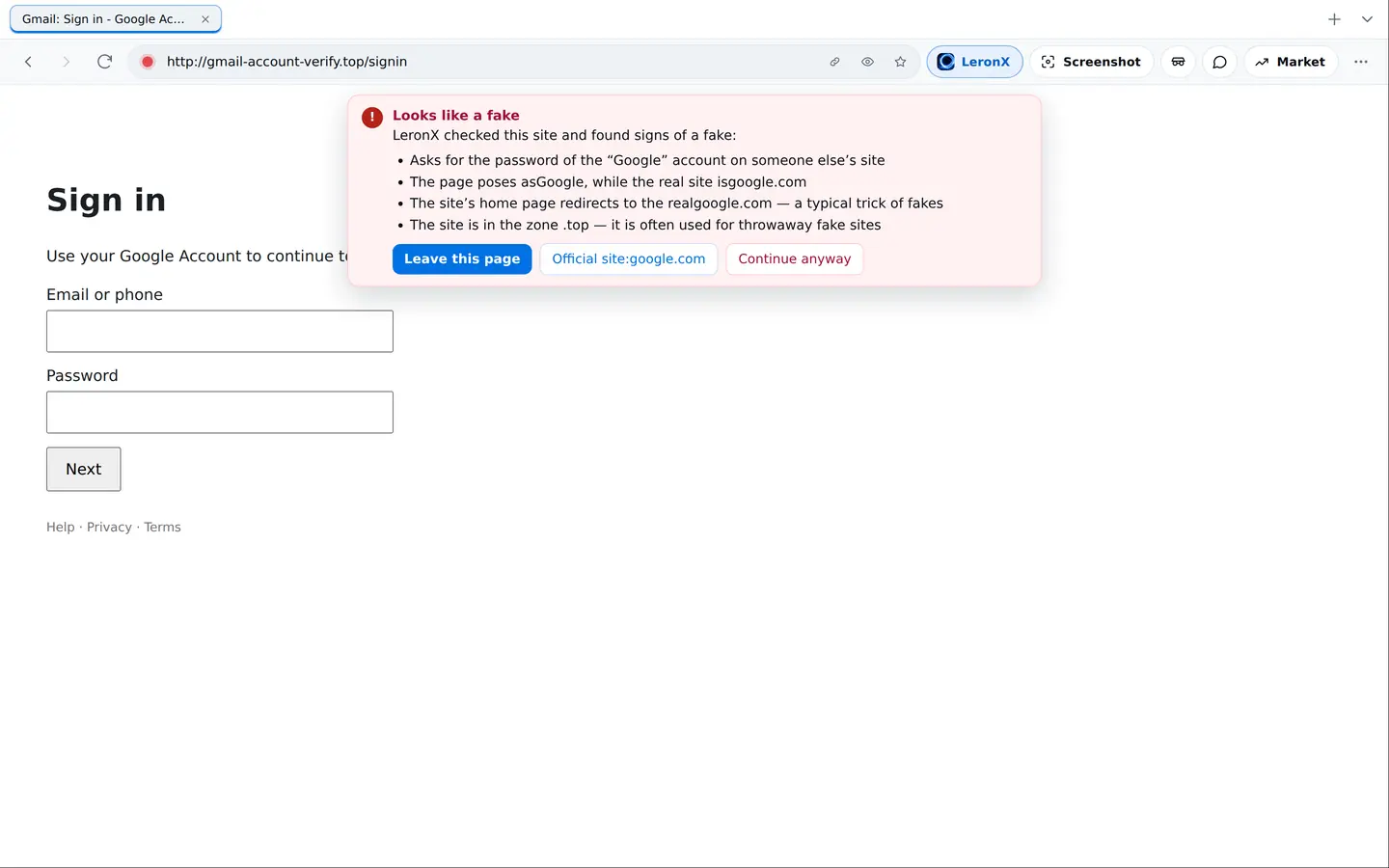
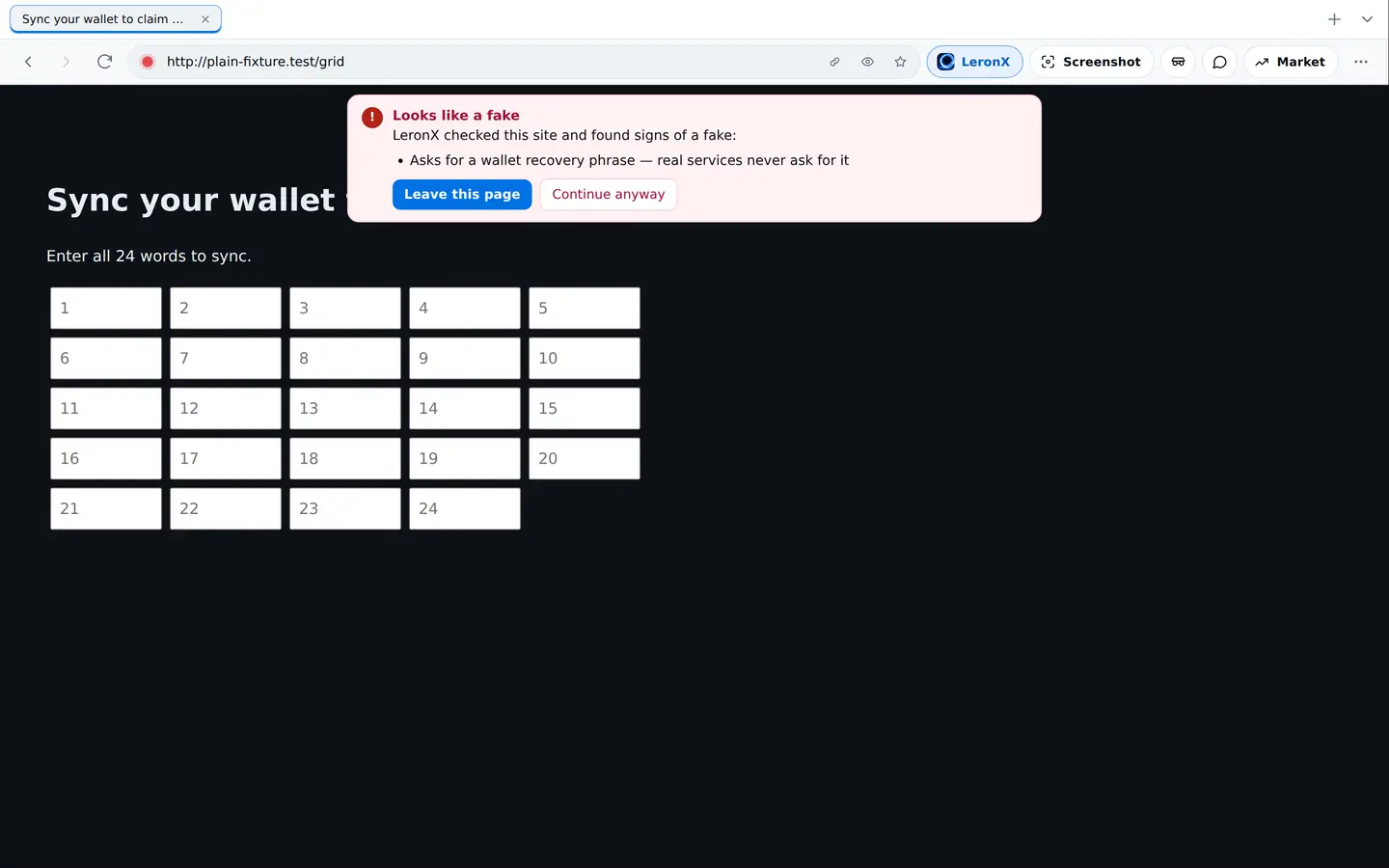
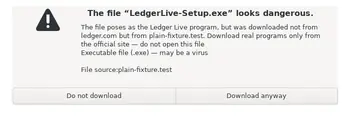
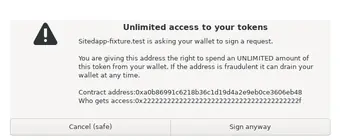
Captured on test pages we built ourselves. No real scam site was opened. System dialogs were captured on Linux — they look different on Windows.
How it differs from Chrome, Edge and Comet
The engine is the same for all of them — Chromium — so we make no claims about page-loading speed. What sets LeronX apart is an AI agent that does the task from plain words, the honest ✓, and on-device protection.
Chrome and Edge are still stronger in maturity, the extension ecosystem, account sync and mobile versions. Our agent answers more slowly than fast AI assistants — the test results say by how much.
We're new — and we build trust on facts only
No made-up testimonials, user counts, "trusted by" logos or awards. Instead: an open method, test results, worked examples on the real app, and an honest list of what we can't do yet.
Open test methodology
The questions, the scoring rules and the results of our live test — including where we are slower.
How the honest ✓ works
A quote-on-page check wired into the code — with an example where the mark honestly drops to ◐.
Worked examples
Screenshots of the app actually finishing a task: a question → an answer with a ✓, a price watch firing, a generated document, a scam warning.
Roadmap and what we can't do yet
What's in flight and where we're honestly weaker. Admitting the limits matters more than hiding them.
Availability: coming soon
In development. Not yet available.
Get notified- Status
- LeronX Shield is in development. There is no public download at the moment.
- Features
- The features described on this page are planned for release and their status is marked on each one.
Where we're still weaker
Worth knowing in advance. The full list is in the "What we can't do yet" section.
- The product is young. It has not been released yet, and there has been no external security audit.
- It answers slower than search-based AIs. The agent opens real pages, which takes time. In our live test of 12 November 2026, LeronX Shield 1.1.7 (unreleased test build) answered all 10 scored questions correctly, but its median answer time was about 45 s against about 22 s for Perplexity Comet. Results
- Windows only. There are no macOS or phone versions, and we promise no dates.
- Not released yet. Everything described here is in development and coming soon.
- AI chat is still stored on our server for now. Before the public launch we move to a direct connection with no storage.
Try it on your own task
Take something you recently searched for yourself and compare it with the agent's answer. LeronX Shield is coming soon.
Join the product waitlist
Our products are coming soon and are not released yet. Leave your email and we will write to you once when the product you choose is ready to try.
About the images on this page: LeronX Shield is not yet released. Images are screenshots from pre-release development builds and design mock-ups; the released product may look and behave differently.